

7 Digital Asset Creation Tips for Modern Marketing Teams
A product launch may begin with a photo shoot and a master video. By launch day, that original content has expanded into social media graphics, website images, email banners, sales presentations, press materials and versions created for different regions or audiences.
The campaign may be successful, but its assets often end up scattered across creative applications, shared drives, project folders, agency links and individual computers. A sales team member asks for the current product image. A regional team recreates a graphic that already exists. No one is sure whether the file labeled “final” is actually approved.
Once those assets have been created, a new problem emerges: the team has no clear plan for how the finished work will be organized, found and used.
Quick Answer: How Can Marketing Teams Improve Digital Asset Creation?
Marketing teams can improve digital asset creation by planning for the full working life of an asset—not only the deadline for producing it. Before work begins, teams should know where the content will appear, which versions will be needed and what information needs to stay connected to the finished files.
A strong content creation workflow also establishes where approved assets will live, when they will move there and who is responsible for adding metadata, recording usage rights and confirming approval. These decisions prevent finished content from becoming another collection of disconnected files.
A digital asset management (DAM) system gives approved content a central, searchable home. Marketing teams can find current versions, understand how assets can be used and distribute the right materials to internal teams, agencies, partners and other audiences.
What Is Digital Asset Creation?
Digital asset creation is the process of planning, producing, reviewing and preparing digital content for use. Digital assets may include photographs, video, graphics, presentations, documents, audio recordings, templates and channel-specific variations.
The process might begin with an original photo shoot, video production or design. It continues as teams crop images, translate copy, add captions, create alternate layouts or even new versions of a master file for social media, email, advertising and other channels.

A finished file isn’t automatically useful. Organizations still have to be able to find it, identify the current version and know whether it’s approved for the way they intend to use it.
Why Does Digital Asset Creation Become Disorganized?
Most creative projects are organized around an immediate deliverable. The team needs to launch a campaign, publish a video or deliver materials to a partner by a specific date.
While the focus on a deliverable is necessary, it can also leave important questions unanswered once the deadline passes:
- Where will the final files be stored?
- Which versions are approved?
- How are the master files and their variations connected?
- What usage restrictions apply?
- Who needs access?
- When should content be updated or retired?
Without clear answers, creative teams develop their own systems. Designers keep working files on local drives. Marketing stores final images in a campaign folder. An agency sends deliverables through a temporary link. Sales downloads copies and saves them somewhere else.

The organization has invested in creating the content, but every handoff makes that content harder to find, trust and reuse.
7 Tips for a More Effective Content Creation Workflow
The best time to keep content organized is before finished files begin stacking up. Decisions made throughout the creative process can determine whether the work becomes a reusable resource or another set of files people struggle to find.
 Check What Already Exists Before Starting From Scratch
A new request doesn’t always require a new asset.
Before commissioning photography or asking a designer to create another graphic, search the existing content library. A previously approved photograph may work with a different crop. An earlier layout may provide the foundation for a new regional version. A current video may contain footage that can be repurposed into shorter clips.
For example, a marketing staff member preparing a seasonal campaign might discover that the organization already owns suitable product photography from the previous year. The team can update the surrounding design instead of arranging another photo shoot.
A searchable DAM gives teams one place to check approved photography, layouts and footage before authorizing new work. Searching first reduces production costs and extends the value of existing content.
 Define How the Content Will Be Used
A creative brief should explain more than what the asset needs to communicate. It should also explain where the content will appear and who will use it.
A single campaign may require
- A high-resolution master image
- Horizontal and vertical website versions
- Social media crops
- Files for email or digital advertising
- Print-ready materials
- Regional or translated variations
- Images for press, partners or distributors
Identifying these needs early helps photographers, videographers and designers capture or create content that can support each format. A subject framed tightly for one social media post, for instance, may not leave enough space for text in a website banner. But if the team knows beforehand that the photo will also be used in a banner, they can plan for that variation in the photoshoot.
Planning the intended uses reduces last-minute editing and lowers the risk that teams will need to recreate or reshoot content. A DAM also helps teams see which formats and variations already exist and keep track of the intended channel, audience or region for each finished file.
 Establish a Clear Handoff for Finished Assets
Work-in-progress files and approved marketing assets serve different purposes.
Creative teams may use Adobe Creative Cloud, Figma, project management platforms or shared working folders while content is being developed. Those tools can support asset production without becoming the permanent home for every approved deliverable.
Teams should agree on the point at which an asset moves from production tools into the DAM. That might be when a first draft is ready for formal review, when a master file is approved or when an agency delivers the completed project.
They should also decide who transfers the files, which versions should be included and how each asset’s status will be recorded. A clear handoff keeps finished content from being stranded in an agency link, email attachment or designer’s project folder after everyone has moved on to the next assignment.
 Capture Metadata While the Details Are Fresh
Metadata is descriptive information connected to a digital asset. It makes the file searchable and helps teams understand what it contains.
Useful marketing metadata may include
- Campaign or project name
- Product, service or subject
- Photographer, designer or agency
- Location and creation date
- Intended audience or region
- Approval status
- Usage rights and expiration date
- Related campaign or channel
The best time to capture this information is when the people involved still remember it.
Six months after a photo shoot, the photographer may recognize a location or participant that no one else can identify. A marketing manager may remember why one image was approved and another was excluded. But if that knowledge hasn’t been recorded, staff may have to rely on filenames, folder locations or personal memory.
Recording that metadata in DAM fields during the handoff makes content searchable while the details are fresh and reduces how much research people have to do before they can confidently reuse it.
 Keep Masters, Versions & Variations Connected
Modern campaigns rarely produce just one final file.
A master design may generate different sizes, formats, languages and layouts. A product photo may have retouched, transparent-background, print-ready and web-ready versions. A video may be adapted into short clips with different captions or aspect ratios.
Those files need more than similar filenames or a shared folder. In a DAM, they can be grouped or linked so someone viewing one version can also find its master and other approved variations.
Imagine that the packaging shown in a product image changes. If the original photograph and every campaign variation are connected, the marketing team can identify which materials have to be updated. If the files are scattered across folders and platforms, an outdated version can easily remain in circulation.
Keeping related assets together makes updates easier, supports brand consistency and helps teams reuse the correct source material.
 Keep Feedback & Approval Connected to the Content
Feedback becomes difficult to follow when it’s divided among email threads, chat messages, project management comments and marked-up attachments.
A reviewer may approve one version while a designer is already working on another. A comment such as “use the second image” becomes meaningless once files are renamed or moved. Later, teams can see the finished asset but not why a particular decision was made.
Reviewing content in the DAM keeps comments, requested changes and approval status attached to the correct version. It also creates a clearer distinction between work that’s still being revised and content that’s ready to use.
That visibility helps projects move forward without forcing teams to reconstruct decisions from several different conversations.
 Plan Distribution & Retirement Before Launch
Creation isn’t complete once an asset is approved. The right people still need an easy way to access it.
A campaign may need to reach internal marketing teams, sales staff, regional offices, media outlets, agencies or distribution partners. Each audience may need a different selection of files, formats or usage instructions.
Instead of sending attachments or creating new shared folders for every request, a DAM can give each audience controlled access to the approved collection it needs. If an asset is updated, users can still return to the same location for the current version.
The workflow should also address what happens when content should no longer be used. A licensed photograph may expire, packaging may change or a campaign may end. Recording rights, expiration dates and other conditions in the DAM helps teams identify assets that need to be removed or restricted.
When these practices are in place, a campaign doesn’t disappear into scattered folders after launch. Creative teams know where to find the source files, reviewers can identify the approved version and other departments can reuse the content without starting over. More importantly, teams can see which assets are outdated or restricted, reducing the risk that content will be shared or used incorrectly.
How NetX Connects Creation to Usability
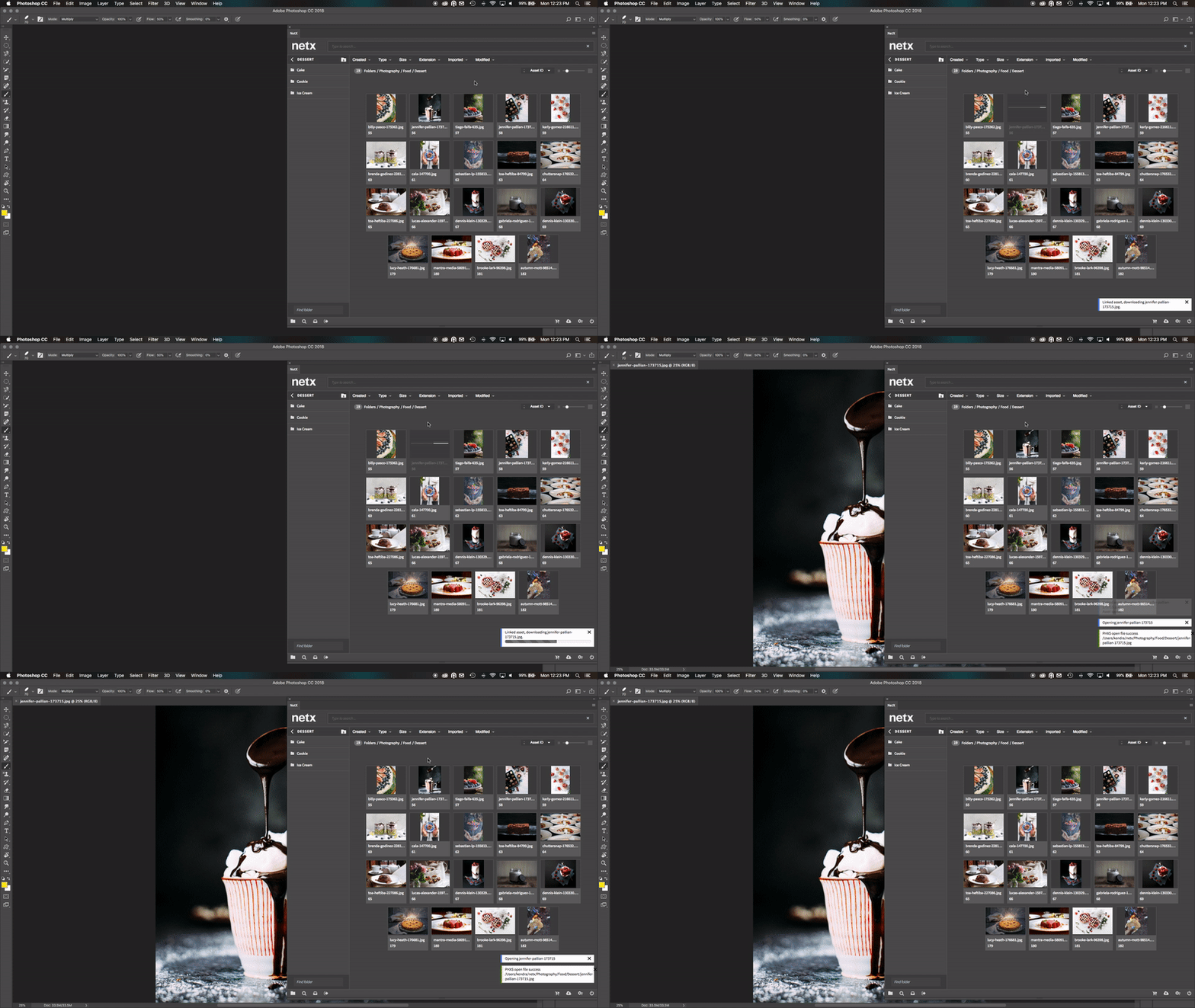
Consider a product campaign that requires national materials as well as versions for several regions. A designer can use the NetX CI HUB integration to access approved product photography and other source materials from within Adobe Creative Cloud.
Designers can save new and updated campaign assets back to NetX instead of exporting them to another disconnected folder. The files remain associated with their campaign information, versions, feedback, approval status and usage requirements.
Once the materials are ready, the marketing team can organize them into collections or branded portals for sales teams, regional offices, agencies and partners. Each audience can then access the files intended for them without requesting individual attachments or searching through the complete content library.
Months later, the same assets can support a presentation, regional promotion or another channel because NetX keeps the creative work in an organized, searchable library beyond its first use.
Digital Asset Creation FAQs
What are examples of digital assets?
Digital assets include photographs, video, graphics, logos, advertisements, presentations, documents, audio recordings, templates and other files that provide value to an organization. A single original asset may also generate several variations for different channels, audiences or formats.
What is a content creation workflow?
A content creation workflow is the process used to move content from an initial request through production, review, approval, organization and distribution. It identifies what needs to happen, who is responsible and where the resulting files and information will be managed.
What is the difference between digital asset creation and digital asset management?
Digital asset creation produces or adapts content. Digital asset management organizes that content and keeps it searchable, controlled and available for use.
The processes overlap when teams review assets in a DAM, create content from approved templates or connect the DAM with design and productivity applications.
When should marketing assets be added to a DAM?
The right point depends on the organization’s workflow. Some teams add important working files when formal review begins, while others transfer assets after final approval.
Teams should define a consistent handoff based on when they need version control, feedback, metadata, rights information or broader access. Final assets should not remain solely in personal folders, temporary transfer links or creative applications.
How does marketing asset management reduce duplicate work?
Marketing asset management gives teams a central place to search existing content before requesting something new. It also keeps related versions and variations connected, making it easier to adapt approved work instead of recreating it.
Does a DAM replace creative or project management tools?
No. Creative tools are used to produce content, while project management tools help teams coordinate assignments and deadlines. A DAM manages the resulting assets and the information needed to find, share and reuse them without losing track of approvals or usage restrictions.
Connections between the DAM and creative tools can reduce manual handoffs and help content remain organized throughout its working life.
Help Every Asset Keep Working
Creative work has more value when it can support more than the deadline that produced it. Assets from a product photo shoot might support a launch campaign today, a sales presentation next month and a regional promotion six months from now—but only if teams can still find the right files.

A thoughtful content creation workflow gives finished assets a clear path from approval to use. NetX provides the structure marketing teams need to organize, manage and distribute what they create so that work remains useful across projects, channels and audiences.

Why Fashion Brands Need Digital Asset Management

DAM for Designers